Picking a tech stack that is built to be found

The biggest thing your tech stack decides is whether your content reaches a search engine or an answer engine as readable HTML, or whether it only shows up after a browser runs your JavaScript. That one choice sets the ceiling on how well your site can be found. A good framework will not write strong content for you, and a poor setup can hide the content you already have. When your words sit behind code that a crawler never executes, Google, ChatGPT, Perplexity and Gemini can all miss them. This guide covers how machines actually read a modern site, where popular stacks quietly lose visibility, and how to choose a setup that hands clean content to every reader you care about, human or machine.
What "built to be found" means now
Being found used to mean one thing, which was ranking in Google. In 2026 your site has three kinds of readers, and a stack built to be found serves all three.
The first reader is the person who lands on the page. The second is a search crawler like Googlebot, which still sends most organic traffic to most sites. The third is the group of answer engines that now sit between a question and a click, including ChatGPT, Perplexity, Google's AI Overviews and Gemini. Each one decides whether to show your page, quote it, or skip it.
The common thread across all three is plain text in the HTML. A human can wait a second for content to appear. A machine often cannot, and in many cases will not. So the real question behind your stack is simple. When a crawler asks for your page, does the answer already contain your words, or does it contain instructions for building the page later.
How your pages deliver HTML matters more than the framework
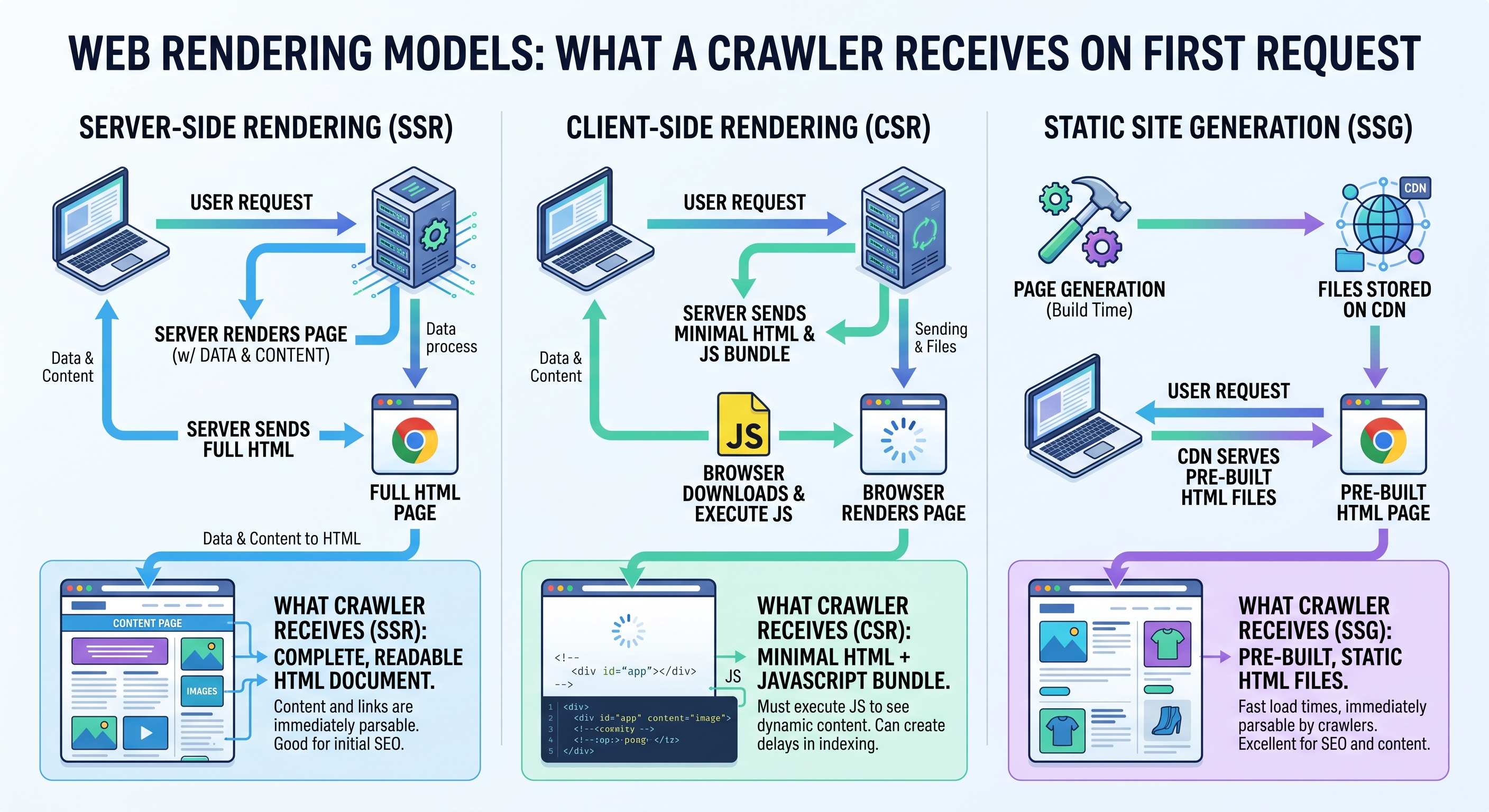
The framework name on your site matters far less than how that framework delivers HTML. There are three common patterns, and the difference between them is what a crawler sees in the first response.
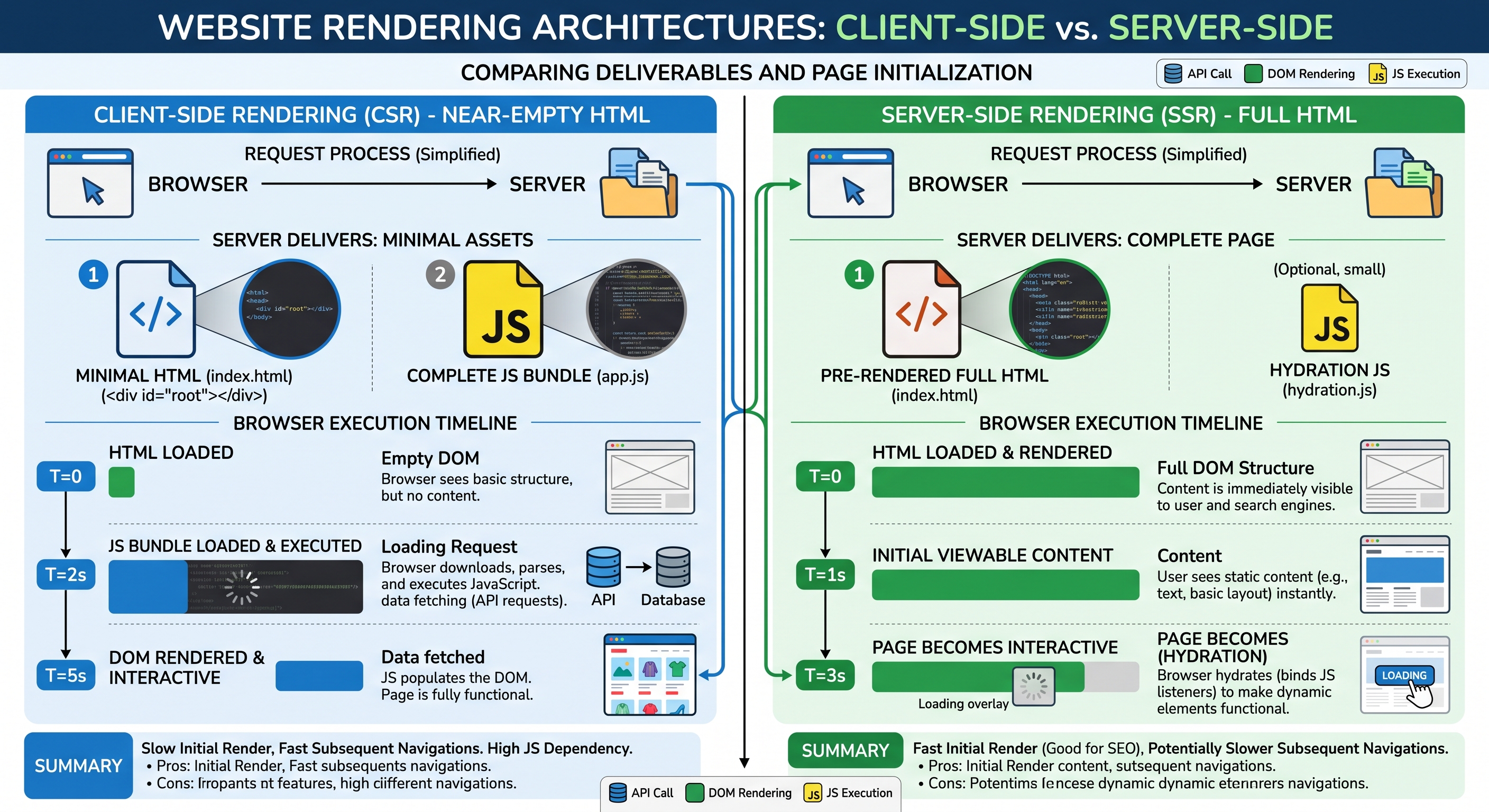
With client-side rendering, the server sends a near empty HTML file and a bundle of JavaScript. The content only appears after the browser downloads that bundle and runs it. This is the default behaviour of many single page app setups built with plain React, Vue or Angular.
With server-side rendering, the server runs the code first and sends back finished HTML with the content already in it. The browser then makes the page interactive. With static generation, the pages are built into finished HTML ahead of time, so the server simply hands over a ready file. Google's own guidance on rendering on the web walks through these models and their trade-offs in depth.
For being found, server-side rendering and static generation both pass the test that matters, because the content is in the first response. Client-side rendering fails it unless the reader runs your JavaScript, and not every reader does.
How Google reads a JavaScript site
Google can run JavaScript, but it does so in a slower, two-stage process that leaves room for things to go wrong. Understanding that process explains why client-rendered content often underperforms even on the one crawler that can read it.
According to Google Search Central, Googlebot handles pages in three phases, which are crawling, rendering and indexing. It first fetches the HTML and reads the links it can find. Pages that need JavaScript then go into a rendering queue, where Google runs them later using a headless version of Chromium. In Google's words, a page "may stay on this queue for a few seconds, but it can take longer than that."
The catch sits in the gap. If your initial HTML is empty and the content only arrives after rendering, Google cannot see that content until the second stage runs, which may be delayed. Google is direct about the safer path, noting that "server-side or pre-rendering is still a great idea because it makes your website faster for users and crawlers, and not all bots can run JavaScript."
That last clause points straight at the bigger problem in 2026, which is the readers that never run JavaScript at all.
Why answer engines are stricter than Google
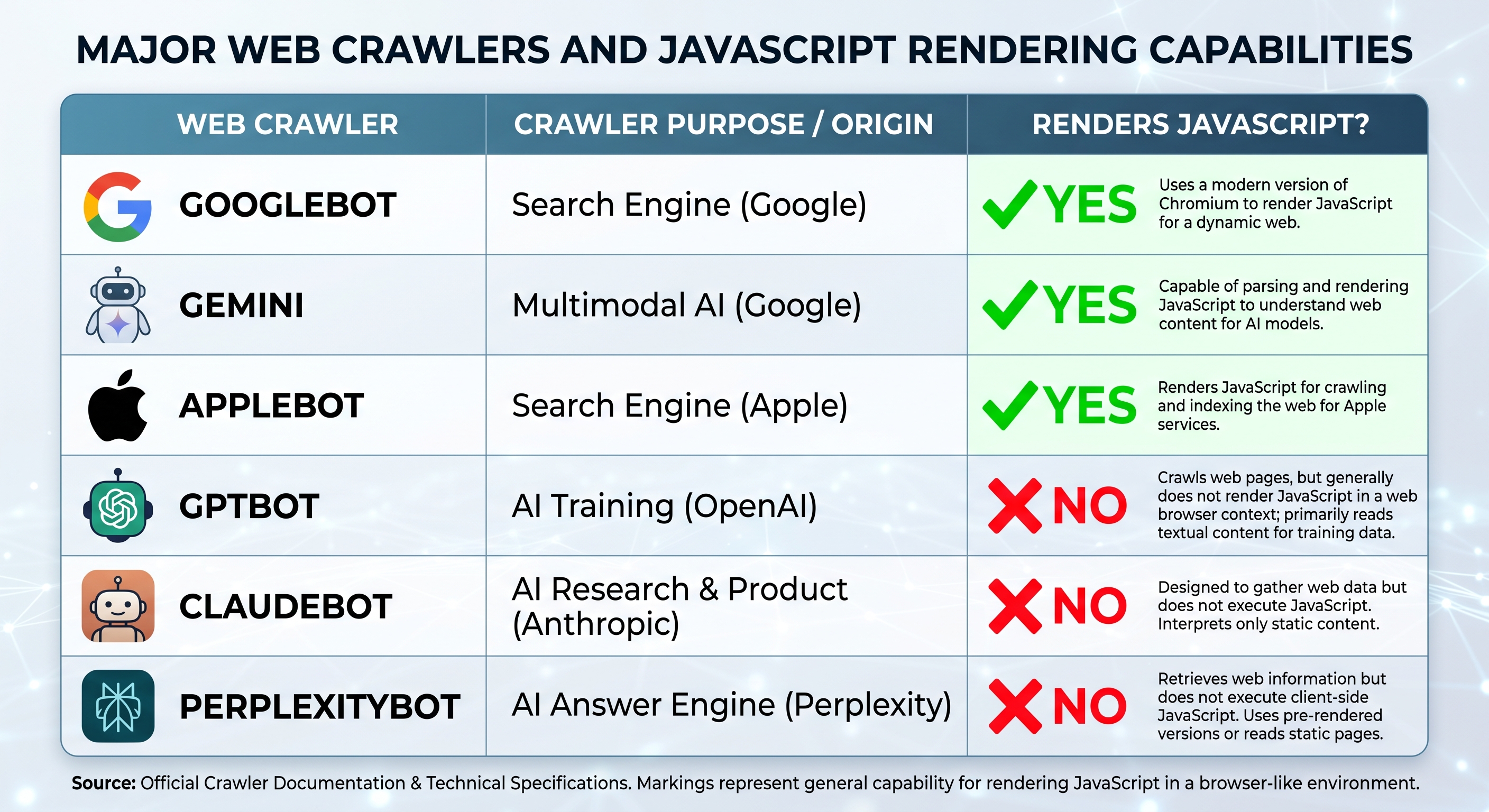
Most AI crawlers do not render JavaScript, so anything that needs code to appear is invisible to them. This is the single most important shift for any founder who wants to show up in AI answers.
Vercel analysed close to a billion crawler requests and found the pattern clearly. In their study of AI crawlers, "none of the major AI crawlers currently render JavaScript," including the bots from OpenAI, Anthropic, Meta and Perplexity. They do fetch JavaScript files at notable rates, with ChatGPT's crawler requesting them in 11.5 percent of cases and Claude's in about 24 percent, but they treat that code as text and never execute it. Content that lives in the first HTML response can still be read and quoted. Content that only exists after the browser builds the page does not reach them.
There are exceptions worth knowing. Google's Gemini uses Googlebot's infrastructure, so it can render, and Apple's crawler renders through a browser too. Those are the minority. If your site depends on client-side rendering, you are betting your AI visibility on the few engines that render and writing off the rest.
This is why the work of answer engine optimization starts at the stack, not the copy. Clean, server-rendered HTML is the precondition for getting cited by ChatGPT, Perplexity and Gemini. Great writing that a crawler cannot read earns nothing.
How your stack sets your Core Web Vitals ceiling
Speed is part of being found, and your stack decides how fast your pages can realistically be. Google measures real-world speed and stability through Core Web Vitals, and those scores feed into page experience signals in search.
There are three metrics to know, and web.dev publishes the thresholds Google treats as good. Largest Contentful Paint measures how long the main content takes to appear, and good is 2.5 seconds or less. Interaction to Next Paint measures how quickly the page responds when someone taps or clicks, and good is 200 milliseconds or less. Cumulative Layout Shift measures how much the layout jumps around while loading, and good is 0.1 or less. Google looks at the 75th percentile of real visits, so a fast result for you on a new laptop is not the number that counts.
Your stack shapes all three. Server rendering and static generation improve the loading metric because content arrives sooner. A heavy client-side bundle hurts responsiveness because the browser has more code to process before it can react. Good image handling and reserved space for media keep layout shift down. None of this is automatic, but a stack that renders on the server gives you a much higher ceiling to work toward. We broke the three metrics down for non-engineers in our Core Web Vitals explainer.
Structured data and semantic HTML give machines the facts
Clean HTML tells a machine what your words are, and structured data tells it what they mean. A stack built to be found makes both easy to add rather than fighting you on them.
Semantic HTML uses the right element for the job, so a heading is a heading and a navigation block is marked as navigation. That structure helps both screen readers and extraction systems understand the shape of your page. On top of that, structured data written in the Schema.org vocabulary states facts in a form machines read directly, such as the author of an article, the price of a product or the steps in a recipe. This is what earns rich results in Google and gives answer engines clean facts to lift. We go deeper in our guide to the structured data that earns rich results and AI citations.
The stack angle here is practical. If your setup renders on the server, your semantic HTML and your schema are in the first response where every crawler can read them. If it renders on the client, your carefully written schema can end up in the same blind spot as the rest of your content.
What else to weigh when you choose
Search visibility is the part of a stack decision most founders underrate, but it is not the only part. A stack you cannot hire for or afford to run is not a good stack, however well it renders. Weigh these together:
- How HTML is delivered, meaning server rendering or static generation by default rather than client-only
- Whether your pages can be statically built where the content rarely changes, which is the fastest and cheapest to serve
- How the framework handles images, since unoptimised media is the most common cause of slow loading
- Clean, stable URLs and proper redirects, so links and rankings survive changes
- Where your content lives, ideally in a system your team can edit without a developer
- Security basics like hardened headers and HTTPS, which protect users and signal trust
- Whether you can see what is happening in production through logging and performance monitoring
- How easy it is to hire people who know the framework, and what it costs to run at your traffic
No single framework wins every line. The goal is a setup where the search-critical parts are handled by default, so being found is the starting point rather than a retrofit.
How to tell what a crawler sees on your site
You do not need engineering access to find out whether your own site has this problem, and the check takes a couple of minutes. The results often surprise founders who assumed their content was visible.
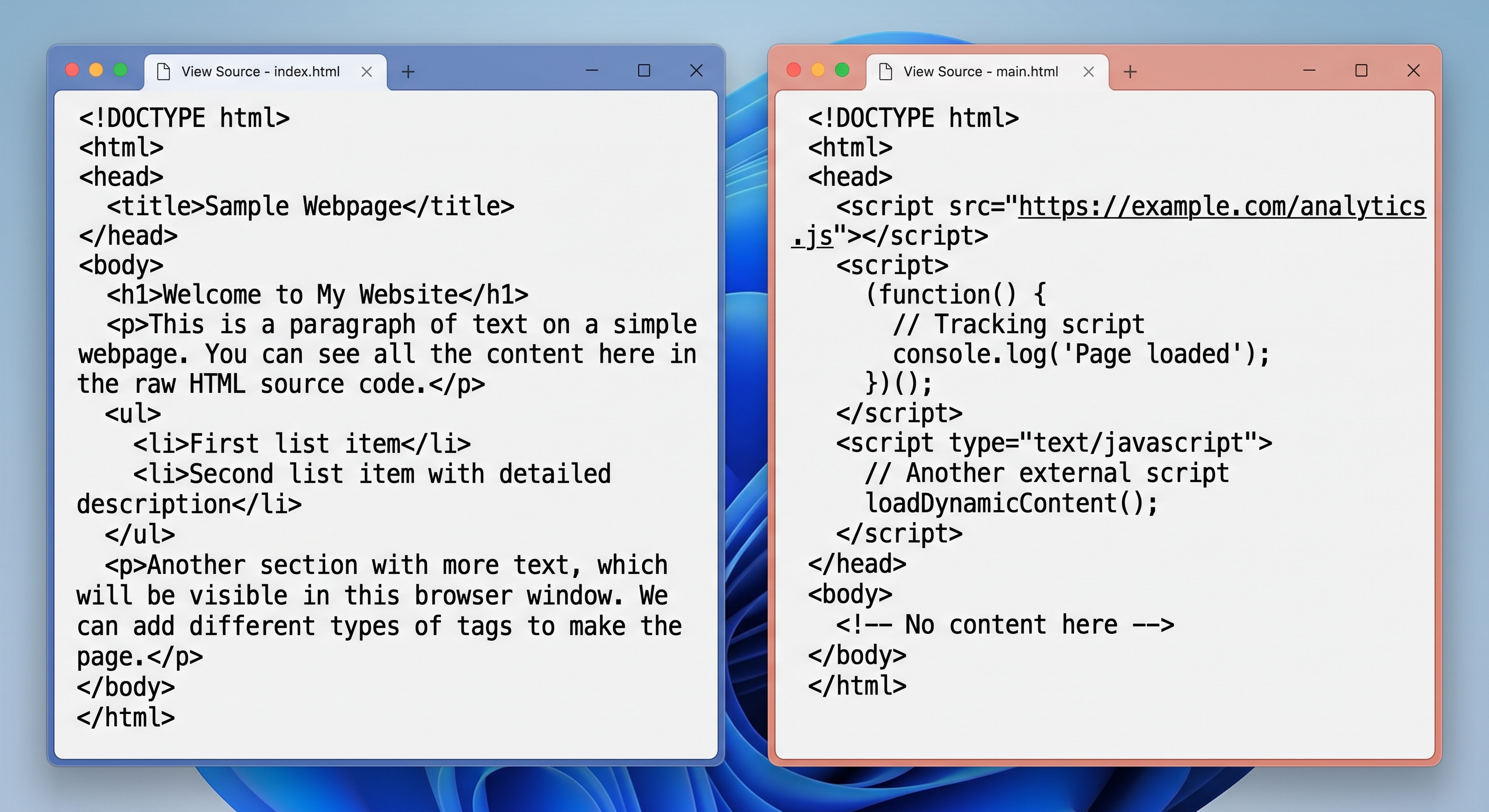
The simplest method is to look at the raw HTML your server sends before any JavaScript runs. In most browsers the "View source" option shows that original response, while the developer inspector shows the page after code has already run, so the two can look very different. If your headline, body copy and main links sit in that raw source, the crawlers that do not render can read them. If the source is mostly empty with a stack of script tags, your content is arriving late.
A second check is to open the page with JavaScript disabled in your browser settings. What remains is close to what a non-rendering crawler receives. A page that goes blank is the warning sign.
For the Google side, the URL Inspection tool in Google Search Console shows the rendered HTML Googlebot produced and flags anything it could not load. That covers the one crawler that does render. Between the raw source and the inspection tool, you can map exactly which readers see your content and which ones see a blank page.
Our default, and why
Our default stack is Next.js with TypeScript, configured to server-render or statically generate content so the first HTML response already contains the words that matter. We chose it because it makes the right thing the easy thing. Pages ship as real HTML that Google, the AI crawlers and a human all read the same way, the framework handles image optimisation and routing well, and TypeScript keeps larger builds stable as they grow. It is also widely used, which means hiring and long-term maintenance stay realistic.
It is not the only good answer. A content site with few moving parts can do just as well on a static site generator, and the right choice always depends on what you are building. What does not change is the principle. Hand clean, complete HTML to every reader, and you remove the most common reason good content never gets seen.
That principle runs through every build, which is why we treat rendering, speed and structured data as part of how we work rather than an afterthought, and it shows in the products we have shipped. If you want a site built this way from the first commit, start a project and we will scope it with you.
Got something to build?
Tell us about your product. We come back within 24 hours with a plan, a timeline and a fixed price.